Artificial intelligence is moving beyond simple question-and-answer chatbots. Modern AI systems can increasingly plan tasks, select tools, retrieve information, call APIs, work with files, and complete multi-step workflows.
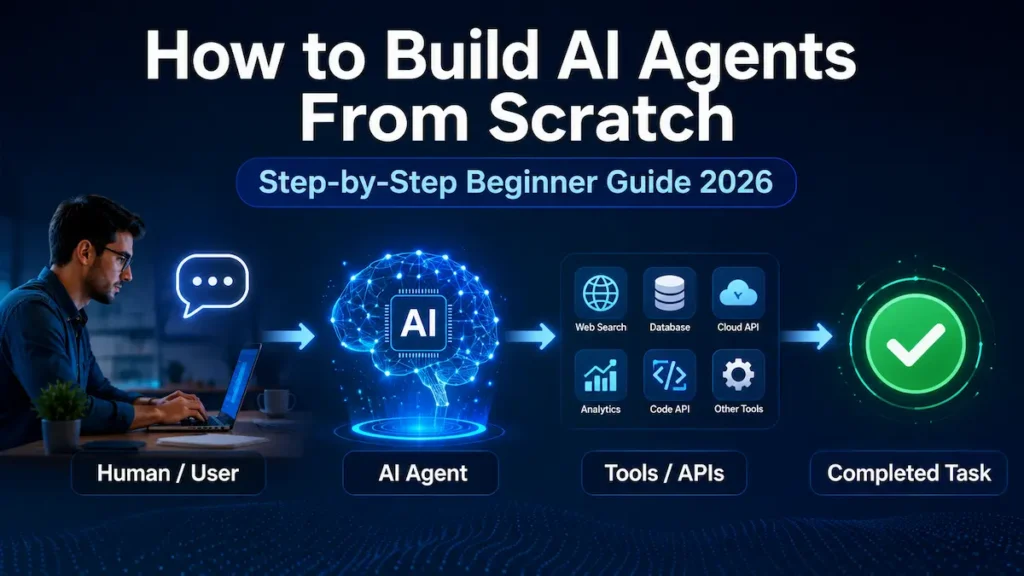
These systems are commonly called AI agents.
If you are wondering how to build AI agents from scratch, you do not need to begin with a complicated multi-agent system. The best approach is to understand the basic architecture first and build one small agent that performs one useful task reliably.
In this guide, you will learn:
- What an AI agent is
- How AI agents work
- The core components of an AI agent
- How to build an AI agent step by step
- How to create a simple agent with Python
- What tools, memory, guardrails, MCP, and frameworks do
- How AI agents differ from chatbots and ordinary workflows
- Common mistakes beginners should avoid
By the end, you should have a practical mental model for building your first AI agent.
What Is an AI Agent?
An AI agent is a software system that uses an AI model to work toward a goal and can take actions using tools.
A normal chatbot typically follows a relatively simple interaction:
User asks a question → AI generates an answer.
An agent can operate more like:
User provides a goal → AI decides what to do → selects a tool → receives the tool result → evaluates the result → takes another action if necessary → returns the final answer.
OpenAI’s current Agents SDK describes agents as language models equipped with instructions and tools, with optional capabilities such as handoffs, guardrails, and structured outputs.
Simple example
Suppose you tell an AI:
Find information about five AI courses, compare them, and prepare a summary.
A chatbot without tools may only answer using information already available in its context.
A properly designed research agent could instead:
- Understand your request.
- Search approved information sources.
- Retrieve relevant information.
- Compare the results.
- Organize the findings.
- Produce a final report.
The key difference is action.
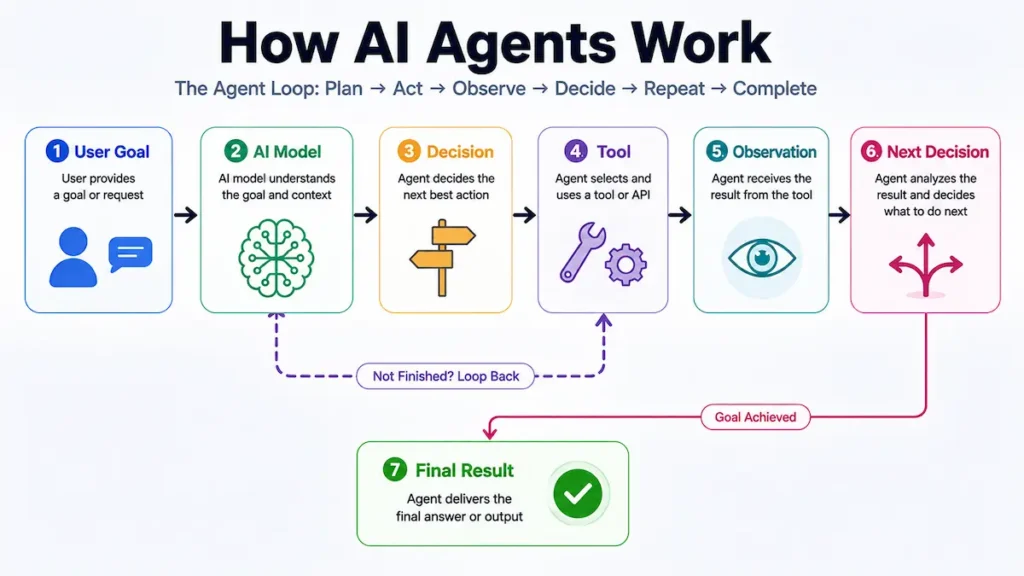
How Do AI Agents Work?
A useful beginner mental model is:
Goal → Model → Decision → Tool → Observation → Next Decision → Final Result
Imagine an AI research agent receives this goal:
“Research the latest developments in AI agents and create a short report.”
The agent may determine that it does not yet have enough information.
It selects a search or retrieval tool.
The tool returns information.
The agent examines that information and decides whether another action is required.
This loop continues until the task reaches a stopping condition.
LangChain’s current documentation describes a similar agent pattern: the model works with tools iteratively until it produces a final output or reaches another stop condition.
This loop is what makes an agent more than a single AI response.
Core Components of an AI Agent
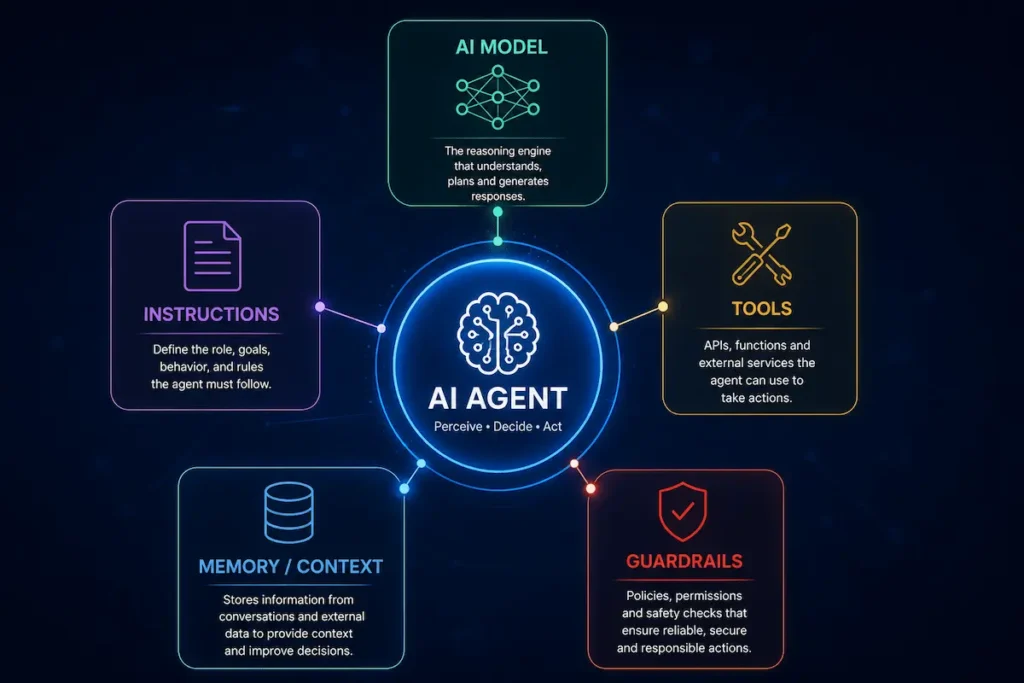
You do not need twenty different technologies to create your first agent. Start with a few fundamental components.
1. AI Model
The model is the reasoning and language-processing component of the agent.
It interprets the user’s goal and determines what should happen next.
Depending on your application, the model may need to:
- Understand natural language
- Extract information
- Generate structured data
- Decide which tool to call
- Analyze tool results
- Plan subsequent actions
- Produce the final response
The most powerful model is not automatically the best model for every agent. You should consider accuracy, latency, cost, tool-use capability, and the complexity of the task.
2. Instructions
Instructions define the agent’s job and behavioral boundaries.
For example:
You are an AI Research Assistant.

Your role is to help users research a topic and provide clear, accurate, and useful information.

When up-to-date information is needed, use reliable sources to research the topic.

Focus on the most relevant facts and explain them in a simple, easy-to-understand way.

Never make up facts or sources. If reliable information is not available, clearly tell the user.
Compare this with:
You are helpful.The second instruction gives the model almost no operational guidance.
Good agent instructions should clearly establish:
Role + Goal + Available actions + Constraints + Expected output
3. Tools
Tools allow an AI agent to do something beyond generating text.
Depending on the application, a tool could:
- Search a database
- Retrieve a document
- Query an API
- Perform a calculation
- Look up inventory
- Read files
- Create a support ticket
- Query a CRM
- Execute approved code
- Update a business system
This is one of the most important concepts in agent development.
The model decides; tools enable actions.
Modern agent frameworks therefore treat tool use as a core building block. OpenAI’s Agents SDK, for example, supports function tools and an agent loop that handles tool invocation and feeds tool results back to the model.
4. Context and Memory
An agent often needs information from previous interactions or earlier stages of a task.
There are different kinds of “memory.”
Short-term context
The agent remembers what happened during the current interaction.
For example:
User: I want to learn Python.
Agent: What is your experience level?
User: Complete beginner.
The agent needs to understand that “complete beginner” refers to Python experience.
Persistent memory
Some applications may need to retain useful information across sessions.
For example, a learning assistant could remember a learner’s progress.
But persistent memory should not be added simply because it sounds advanced. It introduces privacy, security, relevance, and data-management questions.
Add memory only when the use case actually requires it.
5. Guardrails and Permissions
An autonomous system without boundaries can create serious problems.
Suppose you build an email agent.
Reading draft emails may be relatively low risk.
Automatically sending 5,000 emails is very different.
Agents that can perform consequential actions need appropriate permissions, authentication, validation, and sometimes human approval OpenAI’s agent-building guidance recommends layered guardrails and highlights measures such as relevance checks, safety checks, PII filtering, tool safeguards, rules-based protections, and output validation. It also stresses that guardrails should complement conventional authentication, authorization, access controls, and software security.
How to Build AI Agents From Scratch: Step by Step
Now we can build the architecture conceptually.
Step 1: Choose One Specific Problem
A common beginner mistake is trying to build:
“An AI agent that can do everything.”
Don’t.
Choose one narrow problem.
For example:
“Build an agent that takes a research topic, gathers information using approved sources, and creates a structured summary.”
That is measurable.
You can test whether the agent succeeded.
Other beginner-friendly ideas include:
- FAQ agent
- Study assistant
- Document research agent
- Product information assistant
- Content research assistant
- Customer-support triage agent
A good first agent should have a clear goal and a clear definition of success.
Step 2: Define the Input and Output
Before writing code, determine exactly what the agent receives and what it should return.
Input
Topic: Benefits and risks of AI agents for small businessesExpected output
Title
Executive Summary
Key Benefits
Potential Risks
Practical Examples
Conclusion
Sources
This makes testing much easier.
If you cannot describe what successful output looks like, your agent specification probably needs more work.
Step 3: Select the AI Model
Next, choose a model capable of handling your workload.
You may use models from providers such as OpenAI, Google, Anthropic, or another provider supported by your architecture.
Do not select a model based solely on benchmark hype.
Consider:
- Task complexity
- Tool calling
- Reasoning requirements
- Context requirements
- Response speed
- Cost
- Reliability
- Structured-output support
For a beginner project, start simple and optimize later.
Step 4: Write Strong Agent Instructions
Your agent needs a clear operating policy.
For a research assistant, you could define:
ROLE:
You are a research assistant.

GOAL:
Help the user research a topic and create a concise,
well-structured summary.

PROCESS:
1. Understand the research question.
2. Determine whether external information is required.
3. Use approved tools when needed.
4. Analyze the retrieved information.
5. Produce a structured answer.

RULES:
- Do not fabricate sources.
- Distinguish facts from uncertain claims.
- Prefer reliable sources.
- Ask for clarification when the task is ambiguous.
- Do not perform actions outside the research task.
This is much more useful than an enormous prompt filled with unnecessary instructions.
Want to practice writing clear and structured AI instructions? Explore our AI Prompt Library with 1,350+ ready-to-use prompts for practical examples.
Step 5: Give the Agent Tools
Now decide what your agent actually needs access to.
For a research agent, you might eventually provide:
search_web(query)
retrieve_page(url)
save_notes(text)
For an e-commerce support agent:
search_products(query)
check_order(order_id)
create_support_ticket(issue)
Do not expose every available function to every agent.
A smaller, relevant toolset makes the system easier to reason about, secure, test, and maintain.
Step 6: Create the Agent Loop
Conceptually, the heart of an agent looks like this:
Receive user goal

↓
Send goal + instructions + available tools to model

↓
Does model need a tool?

YES → Execute approved tool
      ↓
      Return tool result to model
      ↓
      Model evaluates result
      ↓
      Repeat if required

NO → Generate final answer

↓
Return result
In production, you generally do not want to reinvent every detail of this loop unless you need low-level control. Agent frameworks can manage much of the execution, tool calling, state, tracing, and orchestration for you.
Build a Simple AI Agent With Python
One practical way to learn is to use an agent SDK rather than implementing the complete tool-calling protocol yourself.
The current OpenAI Agents SDK documentation provides a Python-first agent framework with agents, tools, handoffs, guardrails, tracing, and an integrated agent loop.
Install the package:
pip install openai-agentsSet your API key as an environment variable rather than hard-coding it into your Python file.
Then a minimal agent can look like this:
from agents import Agent, Runner

agent = Agent(
    name="AI Learning Assistant",
    instructions=(
        "You are a beginner-friendly AI learning assistant. "
        "Explain AI concepts clearly, accurately, and concisely. "
        "Use simple examples when helpful."
    ),
)

result = Runner.run_sync(
    agent,
    "Explain what an AI agent is to a complete beginner."
)

print(result.final_output)
This follows the current Agents SDK’s Agent + Runner pattern. The SDK also provides asynchronous and streaming execution options.
Before building a complete AI agent, you can practice creating effective AI instructions with our Free AI Prompt Generator.
What is happening here?
Agent defines our AI agent.
name gives it an identity inside the application.
instructions tell the model what role to perform.
Runner.run_sync() starts the agent loop with the user’s input.
final_output gives us the completed result.
This is intentionally simple.
A useful beginner principle is: make the smallest agent work first, then add capabilities.
Add a Tool to Your AI Agent
A text-only agent becomes much more useful when it can call tools.
For example, imagine we have a function that retrieves course information from our own approved database.
Conceptually:
from agents import Agent, Runner, function_tool

@function_tool
def get_course_info(course_name: str) -> str:
    """Return information about a course from the approved course database."""
    # Replace this demo data with your real database/API.
    courses = {
        "ai basics": "AI Basics is an introductory course for beginners.",
        "python basics": "Python Basics introduces core Python programming."
    }

    return courses.get(
        course_name.lower(),
        "Course not found in the approved database."
    )

agent = Agent(
    name="Course Assistant",
    instructions=(
        "Help users find course information. "
        "Use get_course_info when course data is needed. "
        "Never invent unavailable course details."
    ),
    tools=[get_course_info],
)

result = Runner.run_sync(
    agent,
    "Tell me about the AI Basics course."
)

print(result.final_output)
The important architectural change is that the model can now decide when the function should be used.
That gives us:
Reasoning + Action + Observation
rather than only text generation.
AI Agent vs Chatbot vs Workflow
These terms are often mixed together.
| Feature | Basic Chatbot | Traditional Workflow | AI Agent |
|---|---|---|---|
| Answers questions | Yes | Sometimes | Yes |
| Uses an AI model | Usually | Optional | Yes |
| Uses external tools | Sometimes | Yes | Often |
| Chooses next action dynamically | Limited | Usually no | Yes |
| Follows fixed sequence | Often | Yes | Not necessarily |
| Can iterate toward a goal | Limited | Predetermined | Yes |
| Best for | Conversation | Predictable processes | Dynamic multi-step tasks |
A traditional workflow might say:
Always execute A → B → C.
An agent may instead decide:
I need B first, then a tool call, then I need to reconsider whether C is necessary.
This flexibility is powerful, but it also creates more opportunities for errors.
Use an agent when the problem genuinely requires dynamic decisions.
If a deterministic workflow solves the problem reliably, you may not need an agent.
Single-Agent vs Multi-Agent Systems
Another common beginner mistake is immediately creating ten specialized agents.
You might imagine:
Research Agent → Analysis Agent → Writing Agent → SEO Agent → Fact-Checking Agent → Manager Agent
This can work in some applications, but it also creates additional complexity, latency, cost, debugging difficulty, and coordination failure modes.
Start with:
One agent + a small set of well-designed tools.
Move to multiple agents when specialization or delegation produces a measurable benefit.
OpenAI’s Agents SDK supports both handoffs and agents-as-tools for multi-agent orchestration, while its quickstart demonstrates routing tasks between specialist agents.
What Is Agentic AI?
Agentic AI broadly refers to AI systems designed to pursue goals through a sequence of decisions and actions rather than merely generating a single response.
Generative AI primarily focuses on generating outputs such as:
- Text
- Images
- Audio
- Video
- Code
Agentic systems can use generative models as part of a larger system that decides and acts.
For example:
Generative AI:
“Write a customer-support reply.”
Agentic system:
“Inspect the support request → retrieve the customer’s order → check policy → determine the appropriate resolution → draft a reply → request human approval if necessary.”
The distinction is not simply that one is “better.” They solve different classes of problems.
What Is MCP in AI Agents?
Another increasingly important concept is MCP, or Model Context Protocol.
The official MCP documentation defines it as an open-source standard for connecting AI applications with external systems such as data sources, tools, and workflows.
Official Model Context Protocol documentation
A useful analogy from the MCP documentation is to think about MCP as a standardized connection layer between AI applications and external capabilities.
Without a standard connection approach, developers may need custom integration logic for each combination of agent and service.
With MCP, compatible systems can expose capabilities in a standardized way.
For example, an agent might need access to:
Agent → MCP connection → Database
or:
Agent → MCP connection → Business tool
or:
Agent → MCP connection → File/data source
MCP does not automatically make an agent intelligent or safe. It provides a standardized way for AI applications to connect with external capabilities.
Permissions, authentication, tool design, validation, and security still matter.
Popular Frameworks for Building AI Agents
You can build an agent without a large framework, but frameworks become useful as your application grows.
OpenAI Agents SDK
The OpenAI Agents SDK provides agents, tools, handoffs, guardrails, tracing, sessions, and other orchestration capabilities. Current documentation also includes sandbox agents for workloads involving real files and isolated workspaces.
In April 2026, OpenAI described an evolution of the SDK aimed at agents that can work with files, commands, code, and longer-running tasks in controlled sandbox environments.
LangChain and LangGraph
LangChain’s agent documentation describes agents as systems that combine language models and tools and operate iteratively toward a goal.
For more advanced orchestration, LangGraph documentation describes LangGraph as a lower-level runtime for long-running, stateful agents, with capabilities such as durable execution, human-in-the-loop control, and persistence.
Google Agent Development Kit (ADK)
Google’s Agent Development Kit documentation describes ADK as an open-source framework for building, debugging, evaluating, deploying, and scaling AI agents. It supports multi-agent architectures and is currently available across Python, TypeScript, Go, and Java.
For a beginner, however, framework selection should come after understanding agents, models, instructions, tools, and the agent loop.
Do AI Agents Need Memory?
Not always.
Imagine a weather agent whose only job is:
“What’s the weather in Delhi today?”
It may not need long-term memory at all.
But an AI tutor could benefit from remembering:
- Topics already completed
- Learning level
- Previous exercises
- Progress through a course
Memory should therefore solve a real product requirement.
Do not add a vector database, persistent memory layer, or complex retrieval architecture just because another tutorial uses one.
How to Test an AI Agent
Getting one successful response is not enough.
Suppose you build a research agent.
Test it with at least several categories:
Normal request
Research the benefits of AI agents.
Ambiguous request
Research agents.
Does it clarify whether the user means AI agents, human representatives, or something else?
Impossible request
Give me verified information from a database you cannot access.
Does it admit the limitation?
Tool failure
What happens when an API returns an error?
Malicious or manipulative input
What happens when external content tries to override the agent’s instructions?
High-risk action
What happens when a tool can delete data, send money, publish content, or communicate externally?
Production testing should evaluate the entire trajectory, not just whether the final paragraph sounds convincing.
Human-in-the-Loop AI Agents
Not every decision should be autonomous.
Consider an agent that prepares refunds.
A safer design might be:
Agent analyzes request → recommends refund → Human approves → System processes refund
instead of:
Agent analyzes request → Automatically sends money
Human approval is particularly useful for:
- Financial transactions
- Deleting data
- Publishing content
- Sending external communications
- Account changes
- High-value purchases
- Sensitive business decisions
LangGraph specifically includes human-in-the-loop capabilities, and Google’s ADK documentation also emphasizes orchestration, evaluation, and production controls for agent systems.
Common Mistakes When Building AI Agents
1. Starting with a multi-agent architecture
Build one agent first.
Only introduce additional agents when testing demonstrates that specialization is useful.
2. Giving the agent too many tools
Every additional capability increases complexity and potentially expands the security surface.
Give the agent the minimum tools required for its job.
3. Writing vague instructions
“You are helpful” is not an operational specification.
Define the role, goal, constraints, tools, and expected result.
4. Trusting the model with unrestricted actions
AI-generated decisions can be wrong.
Consequential tools should have permissions and approval mechanisms proportional to their risk.
5. Ignoring failures
Test tool timeouts, malformed data, unavailable services, unexpected user requests, and incomplete outputs.
6. Hard-coding API keys
Keep secrets in environment variables or an appropriate secrets-management system.
Never expose private API credentials in client-side code or public repositories.
7. Confusing autonomy with quality
An agent that autonomously performs 20 actions is not necessarily better than a deterministic system that performs three actions reliably.
Reliability matters more than the number of autonomous steps.
Real-World AI Agent Examples
AI agents can be designed for many practical tasks.
Research agent
Searches approved information sources, extracts relevant information, organizes findings, and prepares a report.
Customer-support agent
Classifies a request, retrieves relevant account or policy information, suggests a resolution, and escalates difficult cases.
Coding agent
Inspects code, proposes changes, runs approved tools or tests in an isolated environment, and reports results. OpenAI’s current Sandbox Agents documentation specifically supports agents working with files, commands, and persistent workspaces.
Data-analysis agent
Receives a business question, queries approved datasets, performs analysis, and explains the result.
Voice agent
Combines speech processing with an agent workflow. OpenAI’s current SDK, for example, documents both voice pipelines and low-latency realtime agents.
Can You Build an AI Agent Without Coding?
Yes, depending on what you mean by “build.”
No-code and low-code platforms can help users create AI-driven workflows without writing a complete application from scratch.
However, understanding the architecture is still valuable.
You should understand:
Trigger → Instructions → Model → Tools → Data → Decisions → Actions → Guardrails → Output
For prototypes, no-code tools can be useful.
For custom integrations, advanced security, specialized tools, high scale, or precise orchestration, programming skills become increasingly valuable.
Can You Build AI Agents for Free?
You can learn many agent-development concepts using free/open-source libraries and local experimentation.
However, a production agent is not automatically free.
Potential costs include:
- Model/API usage
- Hosting
- Databases
- Search APIs
- External SaaS APIs
- Observability
- Storage
- Authentication
- Vector databases
- Compute infrastructure
The OpenAI Agents SDK itself is an open-source SDK, while actual model/API usage may incur charges depending on the services you use. Its documentation also exposes usage tracking so developers can monitor requests and token consumption.
So the more useful question is:
How can I build the smallest useful agent and control its operating cost?
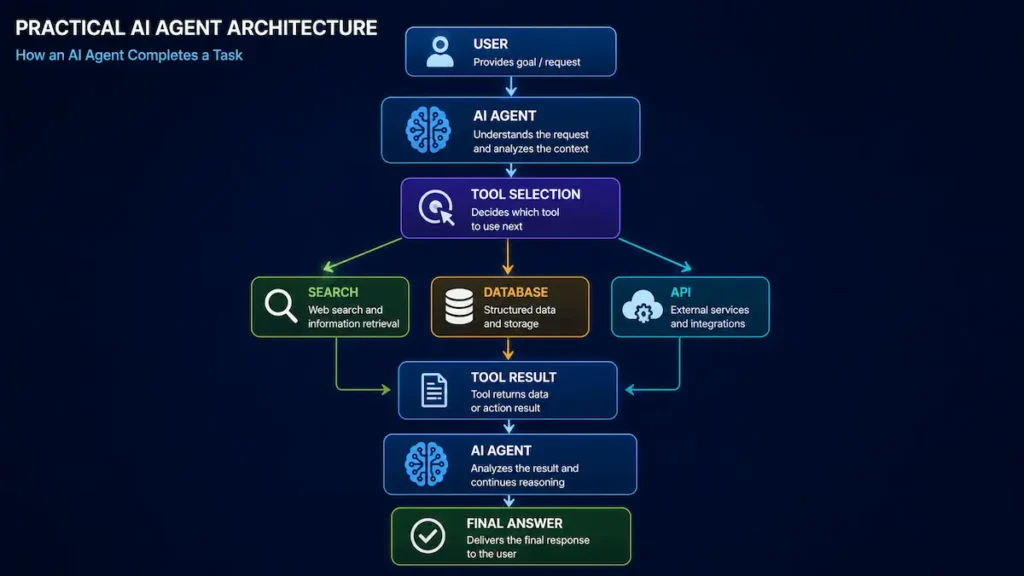
A Practical AI Agent Architecture for Beginners
Your first serious project could use this architecture:
USER
  ↓
APPLICATION
  ↓
AI AGENT
  ├── Instructions
  ├── Model
  ├── Context
  └── Guardrails
        ↓
    TOOL SELECTION
        ↓
 ┌──────┼────────┐
 ↓      ↓        ↓
Search Database  API
Tool   Tool      Tool
 └──────┼────────┘
        ↓
    TOOL RESULT
        ↓
     AI AGENT
        ↓
Does it need another action?
   ↓ YES       ↓ NO
Use tool      Final answer
again
Once this works reliably, you can consider adding:
Persistent memory → MCP connections → human approvals → tracing → evaluations → multiple specialist agents → deployment infrastructure
Not before you need them.
How to Improve Your AI Agent
Once your first version works, improve it systematically.
Improve the instructions
Look at failures and identify ambiguous instructions.
Improve tool descriptions
The model needs to understand what a tool does and when it should be used.
Improve data quality
Better information sources generally produce better agent outcomes.
Add evaluation
Create a fixed test set.
Run it whenever you change prompts, models, or tools.
Add observability
Record appropriate traces such as:
- Which tools were called?
- How long did execution take?
- Where did failures occur?
- How many model calls occurred?
- What did the workflow cost?
OpenAI’s Agents SDK includes tracing for inspecting agent flows, while LangGraph/LangSmith and Google’s ADK ecosystem provide their own approaches to debugging, evaluation, and observability.
Are AI Agents the Future of Artificial Intelligence?
AI agents are an important direction in applied AI because they allow language models to participate in multi-step workflows rather than only generating isolated responses.
Current agent ecosystems already include tool calling, persistent state, human approvals, sandboxed workspaces, multi-agent orchestration, voice interfaces, and standardized external connections such as MCP.
But the future is unlikely to be simply:
“Make everything autonomous.”
A more practical direction is:
Give AI carefully scoped autonomy where it improves the workflow, while keeping deterministic software, security controls, and humans in control where appropriate.
The best agent is not the one that takes the most actions.
It is the one that completes the intended task reliably, safely, efficiently, and measurably.
f you want to understand which AI skills to learn next, use our NextStep AI Career & Growth Roadmap Planner to create a more structured learning path.
Frequently Asked Questions
What is an AI agent?
An AI agent is a software system that uses an AI model to pursue a goal and can often use tools to retrieve information or perform actions. Modern agent frameworks combine models with instructions, tools, state, guardrails, and orchestration.
How do I build an AI agent from scratch?
Start by choosing one specific problem. Define the input and desired output, select a model, write clear instructions, add only necessary tools, implement an agent loop, test failure cases, add appropriate guardrails, and then deploy and monitor the system.
Can a beginner build an AI agent?
Yes. A beginner should start with a single text-based agent and one simple task. Advanced memory, multi-agent orchestration, MCP, and complex infrastructure can be learned later.
Does an AI agent require coding?
Not always. Low-code and no-code platforms can create some agentic workflows. Coding provides more control when you need custom tools, APIs, authentication, testing, deployment, or complex orchestration.
Which programming language is best for AI agents?
Python is one of the most accessible choices because major AI frameworks provide strong Python support. JavaScript/TypeScript is also useful, especially for web applications. Google’s current ADK supports Python, TypeScript, Go, and Java
What is the difference between an AI agent and a chatbot?
A chatbot primarily conducts a conversation. An AI agent can additionally decide what actions to take and use external tools to work toward a goal.
What is agentic AI?
Agentic AI refers broadly to AI systems capable of pursuing goals through sequences of decisions and actions, often using tools and interacting with external environments.
What is MCP?
MCP stands for Model Context Protocol. It is an open-source standard that lets AI applications connect to external tools, data sources, and workflows through a standardized interface.
Should beginners build multiple AI agents?
Usually not at first. Start with one agent and a small number of tools. Introduce multiple agents when specialization or delegation solves a demonstrated limitation.
Conclusion
Learning how to build AI agents from scratch becomes much easier once you stop thinking of an agent as a mysterious autonomous robot.
At its core, the architecture is straightforward:
Give an AI model a clear goal → provide instructions → provide carefully selected tools → let it observe tool results → allow it to decide the next step → stop when the task is complete.
Start small.
Build one agent for one problem.
Make that agent reliable before adding memory, MCP integrations, multiple agents, autonomous computer use, or other advanced capabilities.
The strongest AI-agent applications will not necessarily be the most complicated ones. They will be systems that combine useful AI reasoning with good software engineering, high-quality tools, appropriate human oversight, and strong safety controls.
Further Learning
If you are starting your AI learning journey and want a structured beginner-friendly resource, you can also explore AI Career Starter Series (3 Books in 1), which covers artificial intelligence, ChatGPT, AI tools, and career-focused learning for beginners.
For readers interested in business applications, workflow automation, and the practical use of artificial intelligence in organizations, AI in Business and Automation provides additional learning on this area.